Markdown Handout Builder
Usage Guide and Package Showcase
2026.07.06
v2.0
Why Markdown Handout BuilderMarkdown Handout Builder is a command-line tool for course handouts, internal tutorials, and long-form technical notes. It renders a group of plain Markdown files into an HTML reading version, then prints the same HTML through Playwright Chromium to produce the official PDF. The core goals are simple:
This document is the showcase. It uses Markdown, math, footnotes, tables, image captions, multiple themes, and PDF table-of-contents page numbers generated by this package. 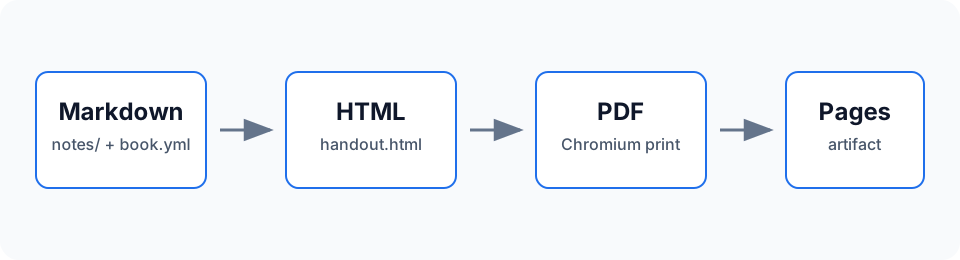 Build ModelA handout has three practical inputs:
The pipeline can be described as:
When to Use ItThis package is a good fit for:
If you need routing, search indexing, interactive components, or a blog engine, use a documentation-site framework. If you need a set of Markdown files to become one printable handout, this package stays deliberately narrow. |
QuickstartThis chapter shows how to use the npm package in a clean note repository. You do not need to copy this repository's InstallUse Node.js 20 or newer. Install the package and the matching Playwright Chromium browser: On Linux CI, install browser system dependencies too: For a new repository, create the minimal scaffold:
Minimal StructureThe smallest useful note repository looks like this: Recommended Configure book.yml
Files not listed in Common Commands
For local writing: Open |
Writing SyntaxChapter content uses ordinary Markdown. Raw HTML is disabled, and Obsidian-specific syntax is rejected by the checker so builds remain portable. Headings and ChaptersEach chapter file should normally have one top-level heading: Top-level headings enter the PDF outline and table of contents. In the PDF, each chapter starts on a new page. Heading IDs are generated from heading text and can be used for internal links. Emphasis, Highlight, and FootnotesMarkdown bold, italic, and Footnotes are useful for citations, side comments, or details that should not interrupt the main paragraph.[1] MathInline math such as is supported, as are block equations: Rendered result:
Math is rendered by KaTeX. The CSS is inlined into the HTML, and font files are copied to Code and Syntax HighlightingFenced code blocks are highlighted at build time (no runtime JavaScript). Name the language after the opening fence: The common highlight.js language set is included (Python, JavaScript, TypeScript, C, Java, Go, Rust, YAML, JSON, Bash, SQL, and more). Unknown languages fall back to plain escaped text. Colors adapt to light and dark themes and print into the PDF; override them with the AdmonitionsCall out notes, tips, warnings, and dangers with fenced containers: Note Four types are available: Optional title The word after the type becomes the title; otherwise the type name is used. Check your units Mixing units is the classic exam mistake. Danger Do not hand-edit files under Theorems and EnvironmentsSemantic blocks for theorems, definitions, examples, and exercises. The tool never auto-numbers them — write the number in the name when you want one, so the Markdown source always matches the output: Theorem 3.1 Cauchy inequality For all real numbers, . Example Numbers, when present, are part of your text — inserting content never shifts them behind your back. Four built-in types: TablesTables are useful for options, commands, and comparisons:
Escape a pipe inside a table cell as ImagesPut local images under An image on its own paragraph is wrapped as Unsupported SyntaxThese forms are not supported: They depend on Obsidian or plugin behavior and are not reproducible outside the editor. Use standard Markdown links and images instead.
|
Themes, Customization, and PublishingThe default package templates include reading styles, print pagination, a cover, a table of contents, a toolbar, and a GitHub Pages index page. Most note repositories only need Multiple ThemesOne build can emit multiple themed outputs:
Custom StylesStart with CSS variables in For deeper changes, add PDF Header, Footer, and NumberingGenerated PDF headers and footers are configured with three slots: The GitHub ActionsThis repository's For npm publishing, prefer Trusted Publishing over a long-lived npm token. Before release, configure a GitHub Actions Trusted Publisher in the npm package settings and point the workflow filename to Release checklist:
OutputA full build generates:
|
Chapters and Page LayoutThe Two Kinds of EntryA A Per-Entry OptionsMost entries are a bare path. When an entry needs more, write it as a mapping with a
Chapter Mini Tables of ContentsSet Turn it on everywhere, or tune its look, from the top level: Because chapter mini-tables live in the body flow, their pages are always counted in the page numbering — only the main contents page can be excluded (see below). Keeping the List in a Separate FileFor large handouts the chapter list can live on its own, next to Front Matter That Is Not NumberedBooks do not number the cover or the contents page, and neither does this tool when you ask it to. Each front-matter section can stay in the PDF while being excluded from page numbering: With both |
|
Colophon Markdown Handout Builder v2.0 · 2026.07.06
Built from plain Markdown with Markdown Handout Builder. |